- Section
EH 4288 :: How to define colors and other product attributes?
Use product descriptors, which allow you to predefine options for colors, sizes, manufacturers, brands, screen sizes etc.
For each product, you can register up to 3 simple descriptors, 3 special descriptors and one color descriptor. This is done on the STORE CONFIGURATION page of the control panel.
COLORS
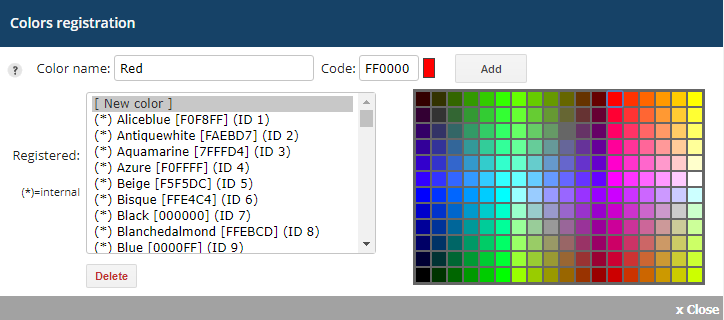
To register colors, go to the STORE CONFIGURATION > PRODUCTS section:

Step 1
Check the Show colors field.
Step 2
Click the arrow to the right of the Show colors field.
Step 3
Click the [New color] option.
Step 4
Enter the Color name.
Step 5
Select the color in the color palette.
Step 6
Click the Add button.
Step 7
Click the Save button at the bottom of the STORE CONFIGURATION page.
Special descriptors
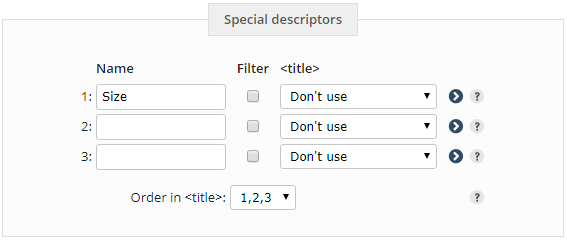
To register a special descriptor, go to the STORE CONFIGURATION page in the Products section of the control panel:
Step 1
Enter the name of the descriptor (e.g. Size).
Step 2
To register the desired values, click the arrow to the right of the descriptor name field.
Step 3
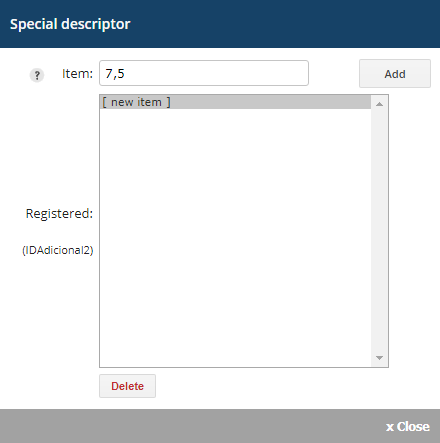
Click the [new item] option.
Step 4
Enter the value of the descriptor (e.g. 7,5).
Step 5
Click the Add.
Step 6
Click the Save button located at the bottom of the STORE CONFIGURATION.
NOTE: The order of the sizes register will be the same order shown in the store. For example, register first size S, then M and then L, so that these sizes are displayed in this order, which is not alphabetic.
Register all existing sizes, even if you do not already have products with some of these sizes. Thus, when registering a product of a new size, this size will already be registered in the correct order.
HTML customization
To link to a particular special descriptor (e.g. products of a certain size), use the following format:
<a href="/product-list.ehc?adv=1&a1=000000">Size 7,5</a>
Exemplo utilizando o formato de URL amigável:
<a href="/prod,adv,1,a1,000000,size-75">Size 7,5</a>
In the examples above, change 000000 by the ID of the size P.
a1: indicates which descriptor is used (e.g. Size)
000000: indicates the size ID 7,5 (e.g. 988)
size-75: indicates the descriptor name to be displayed in the URL
The link above lists all products that are registered with size 7,5.
Simple descriptors
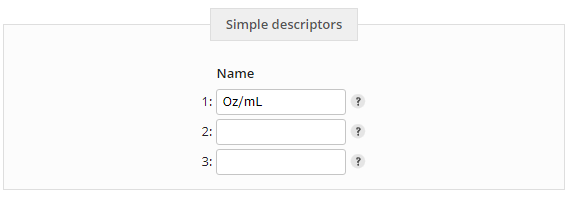
To register a simple descriptor, go to the STORE CONFIGURATION page in the Products section of the control panel:
Step 1
Enter the name of the descriptor (e.g. Oz/ml).
Step 2
Click the Save button located at the bottom of the STORE CONFIGURATION
NOTE: The value of the simple descriptor must be entered on the product registration page.
 See how to create the store categories and subcategories tree.
|